SwiftUI has a native WebView in iOS 26
Table of Contents
For years, showing web content in SwiftUI meant writing this first.
import SwiftUI
import WebKit

struct WebView: UIViewRepresentable {
    let url: URL

    func makeUIView(context: Context) -> WKWebView {
        WKWebView()
    }

    func updateUIView(_ webView: WKWebView, context: Context) {
        webView.load(URLRequest(url: url))
    }
}
Every project had a copy of it. I wrote one myself in WebView in SwiftUI.
In iOS 26, we can delete it.
import SwiftUI
import WebKit

struct ContentView: View {
    var body: some View {
        NavigationStack {
            WebView(url: URL(string: "https://appstorescreenshotstudio.com")!)
                .navigationTitle("WebView(url:)")
                .navigationBarTitleDisplayMode(.inline)
        }
    }
}
WebView(url:) is the whole web view. WebView is a real SwiftUI view now, and it comes from WebKit, so the NavigationStack and the title around it are ordinary SwiftUI.
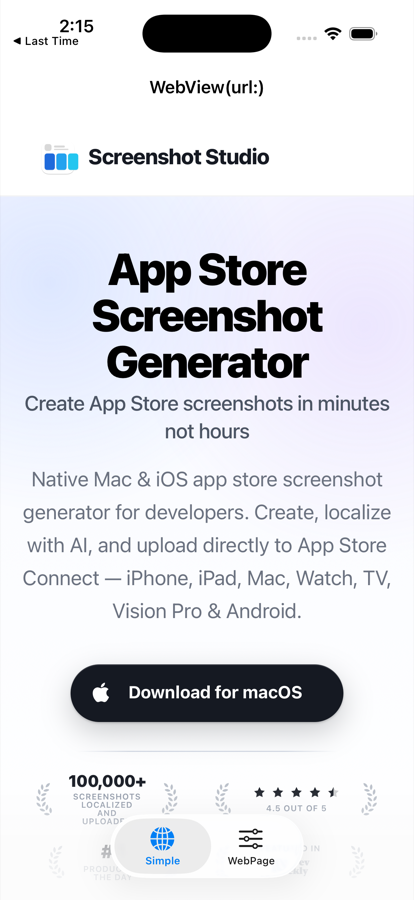
One thing to know about the import. WebView only exists when a file imports both SwiftUI and WebKit. It ships in a cross-import overlay, which is a module that appears when two other modules are used together. Import only SwiftUI and the compiler will tell you WebView is not in scope.
WebPage, for when you need more than a URL
WebView(url:) covers the common case: a terms page, a privacy policy, a help article. It takes the usual SwiftUI modifiers, so the fixed title in the snippet above needs nothing extra.
What it cannot do is tell us anything about the page it is showing. The moment we want a title that follows the page, a progress bar, or reload and back buttons that work, we need the other half of this API.
WebPage is the model behind the view. You create one, hand it to WebView, and read from it.
struct BrowserView: View {
    @State private var page = WebPage()

    var body: some View {
        NavigationStack {
            WebView(page)
                .navigationTitle(page.title)
                .navigationBarTitleDisplayMode(.inline)
        }
        .task {
            page.load(URLRequest(url: URL(string: "https://appstorescreenshotstudio.com")!))
        }
    }
}
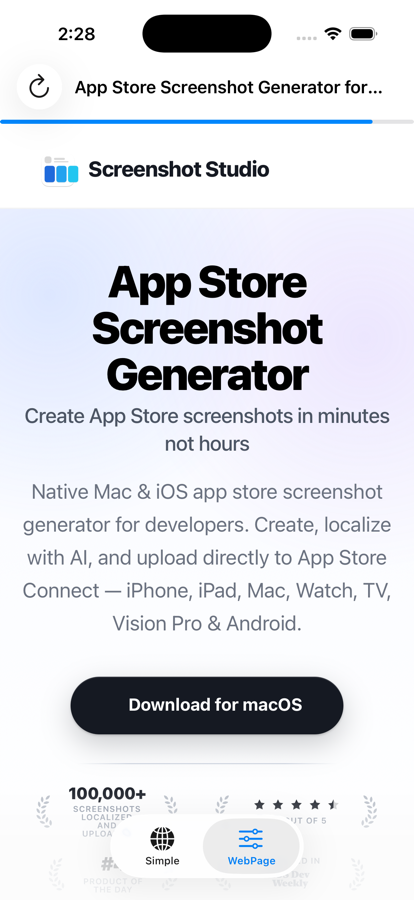
WebPage conforms to Observable, so @State is enough. When the page finishes loading and its title changes, the navigation title changes with it. Nothing to wire up, no coordinator, no delegate.
The title in the screenshot below comes from that one line.

That title is not hardcoded. It is the <title> of the loaded page, arriving through page.title once the load finished.
The properties worth knowing:
page.url               // URL?
page.title             // String
page.isLoading         // Bool
page.estimatedProgress // Double, 0 to 1
page.backForwardList   // .backList, .forwardList, .currentItem
page.hasOnlySecureContent
So a progress bar is now this much code:
WebView(page)
    .safeAreaInset(edge: .top) {
        if page.isLoading {
            ProgressView(value: page.estimatedProgress)
                .progressViewStyle(.linear)
        }
    }
You can easily support sarunw.com by checking out this sponsor.

Offline Transcription: Fast, privacy-focus way to transcribe audio, video, and podcast files. No data leaves your Mac.
Loading and going back
WebPage has the methods you would expect, and a few more.
page.load(URL(string: "https://appstorescreenshotstudio.com")!)
page.load(URLRequest(url: url))
page.load(html: "<h1>Hi</h1>", baseURL: url)
page.reload()
Each of these returns an AsyncSequence of navigation events, and each is marked @discardableResult. So we can fire and forget, as above, or await the events when we care how the load went:
for try await event in page.load(url) {
    print(event)
}
Going back and forward runs through the same load, using an item from the history list.
if let back = page.backForwardList.backList.last {
    page.load(back)
}
And running JavaScript is an async call that returns a value, rather than a completion handler:
let result = try await page.callJavaScript("return document.title")The modifiers
A handful of view modifiers configure the web view itself. These are the ones I expect people to reach for:
WebView(page)
    .webViewContentBackground(.hidden)      // let your own background show through
    .webViewMagnificationGestures(.enabled) // pinch to zoom
    .webViewLinkPreviews(.disabled)         // no long-press preview
    .webViewTextSelection(.enabled)
    .findNavigator(isPresented: $isFinding) // the system find-in-page bar
.webViewContentBackground(.hidden) is the one that solves an old annoyance. A WKWebView draws its own opaque background, so putting one on a colored view meant a white flash on load. Hiding it lets your background show through.
What you still need the old wrapper for
WebView and WebPage are iOS 26 and up. Most apps still support at least one release below that, so the UIViewRepresentable version is not dead yet.
If you support older versions, keep both and pick at runtime:
if #available(iOS 26.0, *) {
    WebView(url: url)
} else {
    LegacyWebView(url: url) // the UIViewRepresentable one
}
You can easily support sarunw.com by checking out this sponsor.
Offline Transcription: Fast, privacy-focus way to transcribe audio, video, and podcast files. No data leaves your Mac.
Summary
iOS 26 adds WebView to SwiftUI, so a one-line WebView(url:) replaces the UIViewRepresentable wrapper we all copied around. Pair it with WebPage when you need the title, the loading progress, the history, or JavaScript, and because WebPage is Observable, reading those properties in your view is all the wiring it takes. Remember to import WebKit alongside SwiftUI, and keep the old wrapper around until your deployment target reaches iOS 26.
Read more article about SwiftUI, WebView, iOS 26, or see all available topic
Enjoy the read?
If you enjoy this article, you can subscribe to the weekly newsletter.
Every Friday, you'll get a quick recap of all articles and tips posted on this site. No strings attached. Unsubscribe anytime.
Feel free to follow me on Twitter and ask your questions related to this post. Thanks for reading and see you next time.
I also make short videos and visual guides on Patreon. Some things are easier to see than to read, like how an API looks and moves on a real screen. If you like to learn that way, come and watch. Sharing the article is also greatly appreciated.
Become a patron Tweet ShareCodable errors are finally readable in Swift 6.3
DecodingError and EncodingError now print a clean one-line summary with the coding path, instead of the wall of text we used to skim past.
Why some Swift types only appear when you import two modules
Map, PhotosPicker, and WebView are not in SwiftUI. They live in cross-import overlays, modules that only show up when you import both halves. Here is what that means and how to spot one.