The new JSON project format in Xcode 27.2
Table of Contents
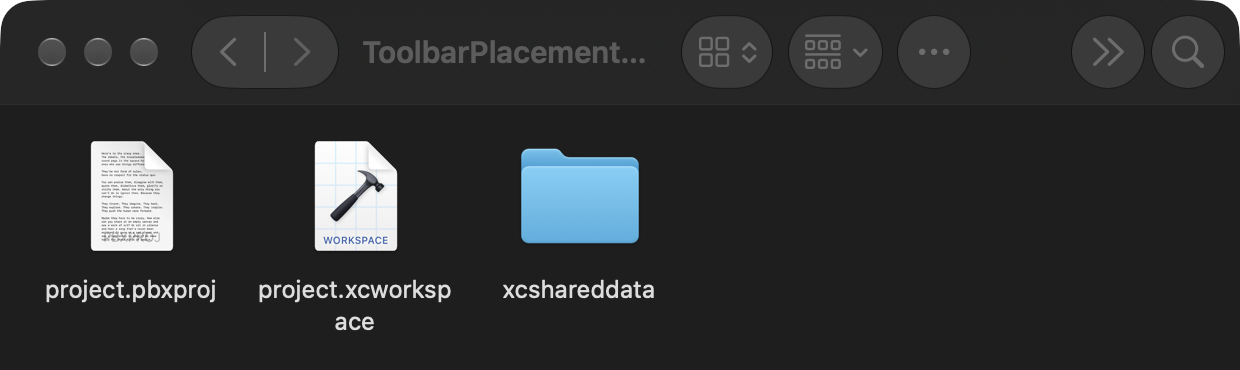
The .xcodeproj you see in Finder is a folder. The file that actually describes your project lives inside it, and for the last twenty years it has been project.pbxproj, an old-style property list.
Xcode 27.2 changes that. The project configuration file is now project.xcproj, and it holds JSON.
Before
After
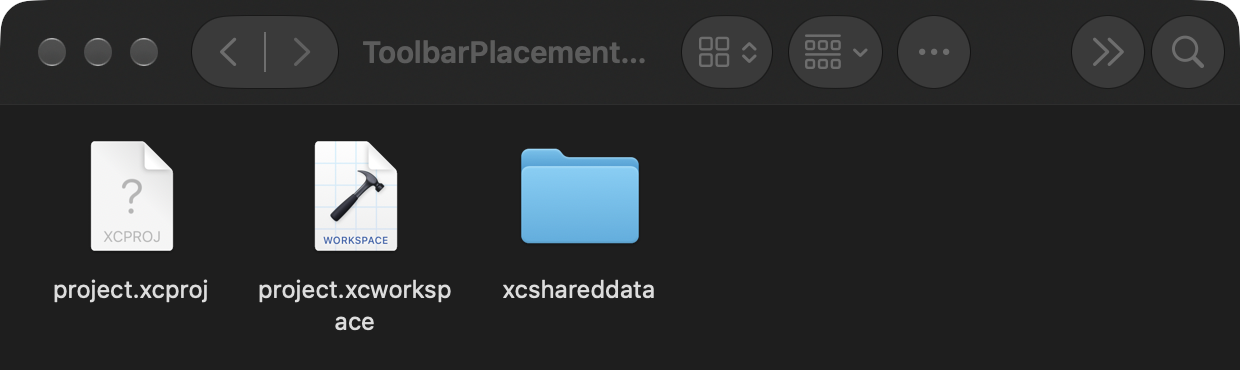
.xcodeproj and choose Show Package Contents to see the file that changed.What the file looks like
Here is a small SwiftUI app after the switch. This is the whole file, trimmed only where the build settings repeat:
{
  "default-configuration": "Debug",
  "configurations": [
    "Debug",
    "Release",
  ],
  "localizations": {
    "development": "en",
    "supported": [
      "Base",
    ],
  },
  "files": [
    {
      "kind": "group",
      "path": "Sources",
      "children": [
        { "path": "CatalogView.swift", "target-membership": [ "ToolbarPlacements/compile-sources" ] },
        { "path": "Placement.swift", "target-membership": [ "ToolbarPlacements/compile-sources" ] },
        { "path": "PlacementDemoView.swift", "target-membership": [ "ToolbarPlacements/compile-sources" ] },
        { "path": "ToolbarPlacementsApp.swift", "target-membership": [ "ToolbarPlacements/compile-sources" ] },
      ],
    }, {
      "kind": "group",
      "name": "Products",
      "children": [
        { "path": "<PRODUCTS>/ToolbarPlacements.app", "id": "452F9F298449F49E8DD1A8B8", "index": false },
      ],
    },
  ],
  "targets": [
    {
      "name": "ToolbarPlacements",
      "id": "34ADAADA38403407EE942D7C",
      "product": "Products/ToolbarPlacements.app",
      "product-type": "application",
      "build-phases": [
        "compile-sources",
      ],
      "build-settings": {
        "PRODUCT_BUNDLE_IDENTIFIER": "com.sarunw.demo.ToolbarPlacements",
        "SDKROOT": "iphoneos",
        "SWIFT_VERSION": "6.0",
        "TARGETED_DEVICE_FAMILY": "1",
      },
    },
  ],
  "build-settings": {
    "IPHONEOS_DEPLOYMENT_TARGET": "27.0",
    "DEBUG_INFORMATION_FORMAT[config=Debug]": "dwarf",
    "DEBUG_INFORMATION_FORMAT[config=Release]": "dwarf-with-dsym",
    "SWIFT_OPTIMIZATION_LEVEL[config=Debug]": "-Onone",
    "SWIFT_OPTIMIZATION_LEVEL[config=Release]": "-O",
  },
  "last-upgrade": "14.3",
}
Three things are worth pointing out.
The object graph is gone. A .pbxproj is a flat bag of objects keyed by 24-character hex IDs, and everything points at everything else by ID. A source file needs a PBXFileReference to exist, a PBXBuildFile to be compiled, an entry in a PBXGroup to show up in the navigator, and an entry in a PBXSourcesBuildPhase to reach the target.
So one change to your files lands in three or four places at once, as three or four separate diffs. Every iOS developer has been through this merge conflict nightmare.
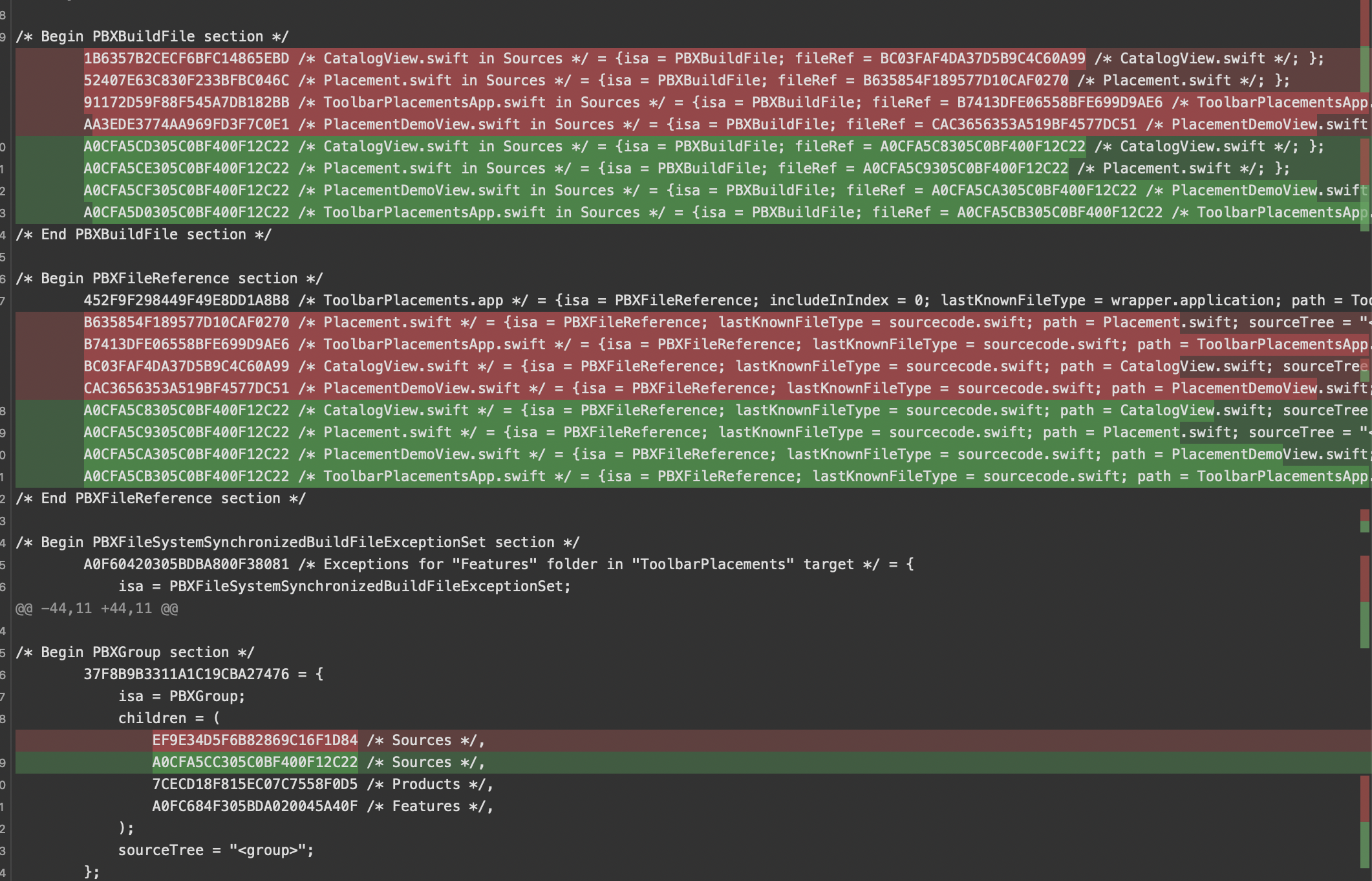
In the JSON file that same file is one line, nested in the group it belongs to, with a target-membership array saying which target compiles it.

Build configurations collapse. The old format stores a separate XCBuildConfiguration object per configuration per target, so most settings are written twice. The new format writes a setting once and appends a condition when it differs:
"DEBUG_INFORMATION_FORMAT[config=Debug]": "dwarf",
"DEBUG_INFORMATION_FORMAT[config=Release]": "dwarf-with-dsym",
In my demo, 161 lines of XCBuildConfiguration became a single build-settings block.
IDs only appear where they are needed — on targets and on the built product — instead of on every node.
You can easily support sarunw.com by checking out this sponsor.

AI Grammar: Correct grammar, spell check, check punctuation, and parphrase.
Is it the default for new projects?
Yes. In Xcode 27.2 and later, a project you create gets the JSON file.
Projects made in earlier versions keep their property list until you switch them over.
Switching an existing project
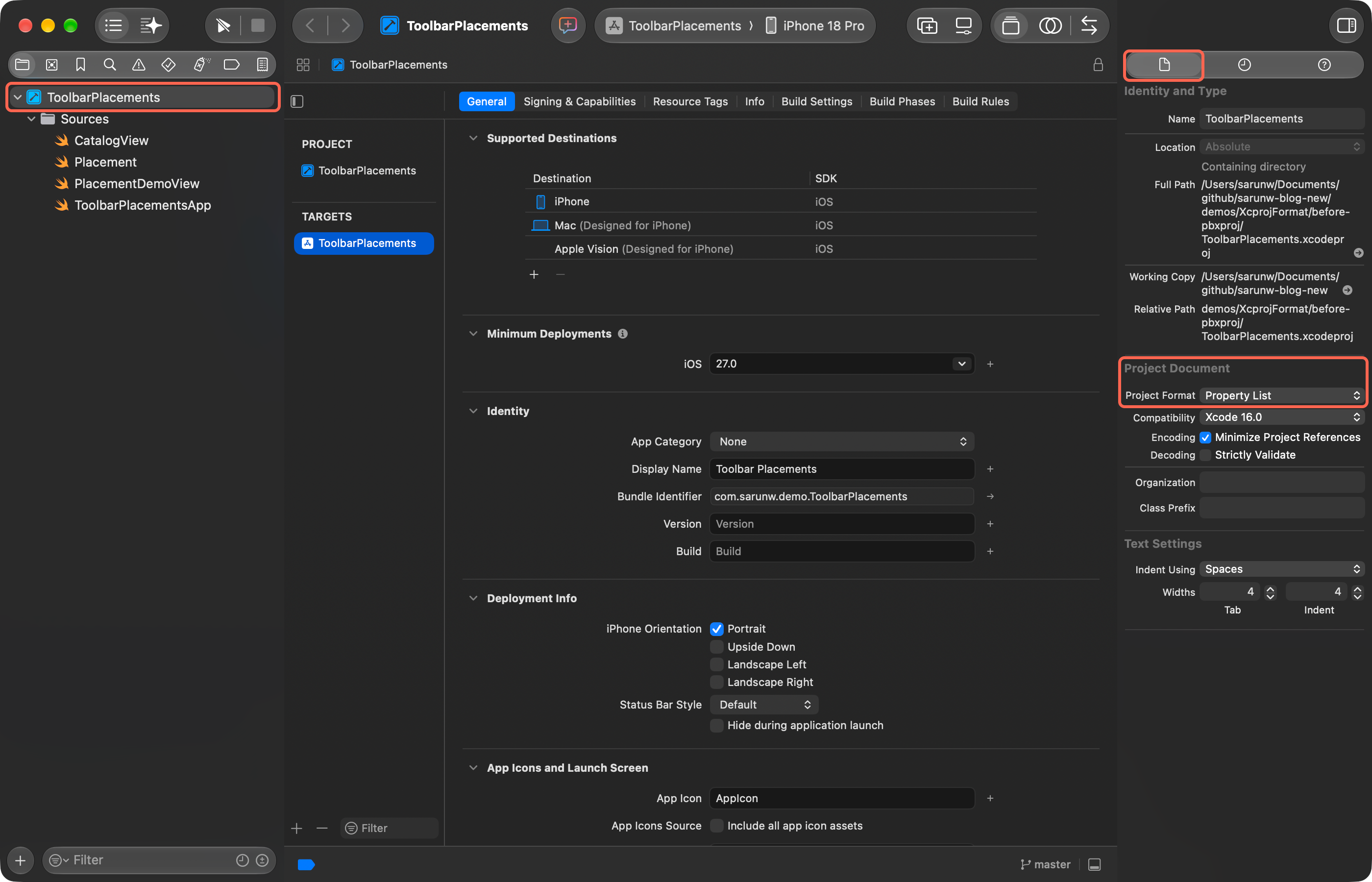
In Xcode, select the project at the top of the navigator, open the File inspector on the right (⌥⌘1), and pick JSON from the Project Format pop-up under Project Document. Click Continue if you get a confirmation dialog. The JSON option only appears in Xcode 27.2.
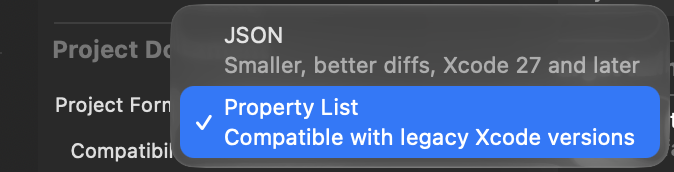
project.pbxproj is deleted and project.xcproj takes its place. On my demo project the commit looked like this:

The project still builds, and the scheme, workspace, and shared data inside .xcodeproj are untouched.
What you actually gain
Two different things made .pbxproj painful, and Apple fixed them two years apart. They are worth separating, because you may already have the first one.
Step one: adding files stops changing the project
Adding a single Swift file to a classic group touches four sections of the property list and mints two new IDs:
@@ -10,11 +10,13 @@
  		1B6357B2CECF6BFC14865EBD /* CatalogView.swift in Sources */ = {isa = PBXBuildFile; fileRef = BC03FAF4DA37D5B9C4C60A99 /* CatalogView.swift */; };
+ 		A09C48CA305BCAF50096EB34 /* SettingsView.swift in Sources */ = {isa = PBXBuildFile; fileRef = A092B4A9305BCAF00055402B /* SettingsView.swift */; };

 /* Begin PBXFileReference section */
+ 		A092B4A9305BCAF00055402B /* SettingsView.swift */ = {isa = PBXFileReference; lastKnownFileType = sourcecode.swift; path = SettingsView.swift; sourceTree = "<group>"; };
@@ -45,6 +47,7 @@
  				B7413DFE06558BFE699D9AE6 /* ToolbarPlacementsApp.swift */,
+ 				A092B4A9305BCAF00055402B /* SettingsView.swift */,
@@ -104,6 +105,7 @@
  			files = (
+ 				A09C48CA305BCAF50096EB34 /* SettingsView.swift in Sources */,
Both IDs are generated fresh, so a teammate adding a different file on their branch generates different ones in the same four places. That is the classic .pbxproj merge conflict.
Synchronized folders, the blue ones Xcode 16 added, fixed exactly this. The folder stores no file list at all — Xcode reads the directory instead.

Drop a new file in and the project file does not change at all. It still compiles. If adding and removing files is all you ever do, folders already solved your problem.
Step two: everything else stops duplicating
Folders only cover your source files. Everything else in the project file is exactly as it was: targets, build phases, build configurations and package references are still objects with IDs pointing at each other.
Settings, for one, stop being written twice. This project has two configurations, Debug and Release, and a property list keeps a separate copy of every setting for each one. Set the deployment target and the same line has to land in both:
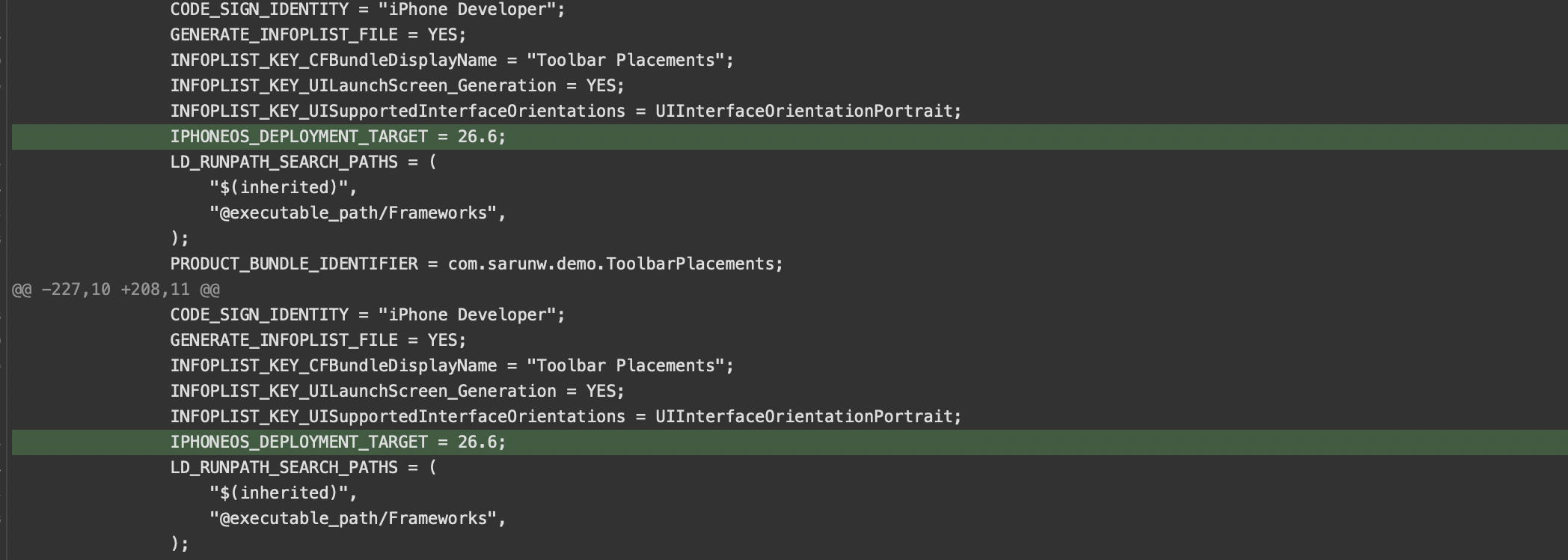
In JSON it is written once:
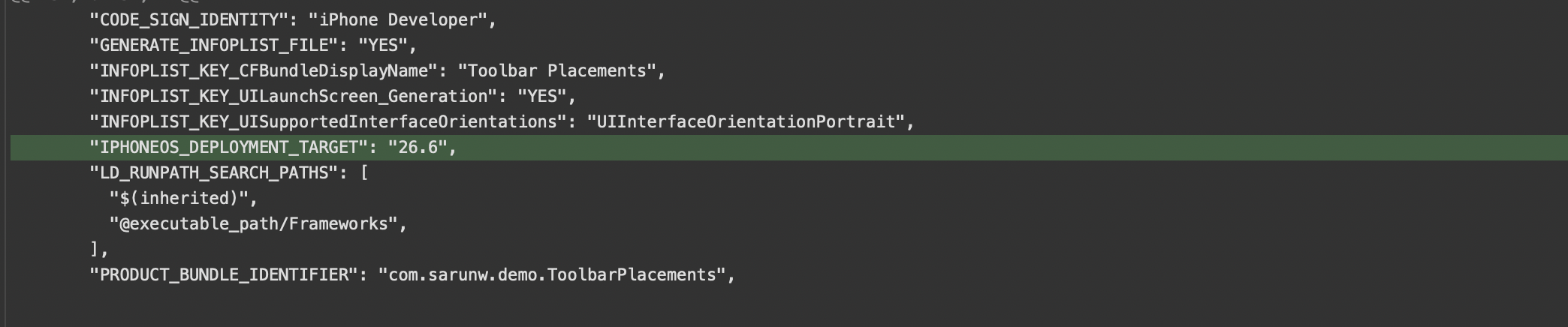
A setting only splits when Debug and Release genuinely differ, and then the key itself carries the condition:
"MTL_ENABLE_DEBUG_INFO[config=Debug]": "INCLUDE_SOURCE",
"MTL_ENABLE_DEBUG_INFO[config=Release]": "NO",
Folders fix the file list. JSON fixes the file. You do not have to choose between them — a blue folder inside a .xcproj is the smallest, plainest project file you can have.
Backward compatibility
Xcode 27.0 and 27.2 can both open a JSON project.
The only real concern is third-party tooling. Anything that reads project.pbxproj directly — CocoaPods, XcodeGen, Tuist, CI scripts, and the various xcodeproj libraries — has to learn the new file first.
I expect that to happen quickly. JSON is far easier to parse than an old-style property list, so supporting it is less work than what these tools already do today.
You can easily support sarunw.com by checking out this sponsor.
AI Grammar: Correct grammar, spell check, check punctuation, and parphrase.
Should you switch
If your whole team is on Xcode 27, the diffs alone are worth it, and switching is one pop-up away.
If anyone is still on Xcode 26, or your build depends on a tool that reads project.pbxproj, wait. The format isn't going anywhere, and .pbxproj still works in Xcode 27.
Read more article about Xcode, Xcode 27, or see all available topic
Enjoy the read?
If you enjoy this article, you can subscribe to the weekly newsletter.
Every Friday, you'll get a quick recap of all articles and tips posted on this site. No strings attached. Unsubscribe anytime.
Feel free to follow me on Twitter and ask your questions related to this post. Thanks for reading and see you next time.
I also make short videos and visual guides on Patreon. Some things are easier to see than to read, like how an API looks and moves on a real screen. If you like to learn that way, come and watch. Sharing the article is also greatly appreciated.
Become a patron Tweet ShareSwiftUI Liquid Glass - Regular vs Clear
Learn the difference between regular and clear Liquid Glass in SwiftUI, how each affects foreground colors, and when to use them.